Video Teleprompter2.2
Publisher Description
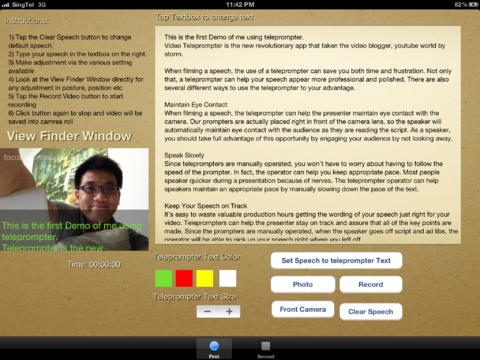
Ever need to take a video of you speaking to an audience? Use Video Teleprompter to your advantage!
The Easiest way to record "perfect" speeches. Create professional recordings on your iPad using the Video Recording Teleprompter. The built-in Teleprompter displays the exact message you should be saying while at the same time recording it
Whether you need to practise for your next public talk, recording youtube video, Video Teleprompter is the ideal tool for you.
Here is what makes Video Teleprompter great:
* Create great-looking videos for your vlog (Video Blog)
* Share your videos with your friends through email or upload to Youtube
* Record in portait or landscape mode. You choose.
* Adjust the speed of the scrolling text on screen to suit your talking rythm and style
* Know exactly how long is your talk with the built-in timer
* Review your videos instantly to make any changes you might need.
With Video Recording Teleprompter, you can turn your phone into a teleprompter and start improving you speech delivery immediately.
Aug 22, 2017 Version 2.2
+Updated for 64 bit compatible
About Video Teleprompter
The company that develops Video Teleprompter is APPTREME STUDIO. The latest version released by its developer is 2.2.
To install Video Teleprompter on your iOS device, just click the green Continue To App button above to start the installation process. The app is listed on our website since 2017-08-22 and was downloaded 18 times. We have already checked if the download link is safe, however for your own protection we recommend that you scan the downloaded app with your antivirus. Your antivirus may detect the Video Teleprompter as malware if the download link is broken.
How to install Video Teleprompter on your iOS device:
- Click on the Continue To App button on our website. This will redirect you to the App Store.
- Once the Video Teleprompter is shown in the iTunes listing of your iOS device, you can start its download and installation. Tap on the GET button to the right of the app to start downloading it.
- If you are not logged-in the iOS appstore app, you'll be prompted for your your Apple ID and/or password.
- After Video Teleprompter is downloaded, you'll see an INSTALL button to the right. Tap on it to start the actual installation of the iOS app.
- Once installation is finished you can tap on the OPEN button to start it. Its icon will also be added to your device home screen.
Program Details
System requirements
Download information
Pricing
Version History
version 2.2
posted on 2017-08-22
Aug 22, 2017 Version 2.2
+Updated for 64 bit compatible
version 2.1
posted on 2012-04-18
version 2.2
posted on 1970-01-01
22 de ago de 2017 Version 2.2
+Updated for 64 bit compatible
